
AI Companion Robots in 2026: What They Are and How They're Built
You have seen the clips. A humanoid hands a guest a coffee in a hotel lobby. A quadruped trots up to greet a visitor at a corporate entrance. A robot pauses, tilts its sensor head, and appears to read the room before it acts. The clips are convincing. But the question you actually carry back to your team isn't "is this cool?" — it's "can we build one of these in 2026, or is this still a research-lab fantasy that burns two years and a seven-figure budget?"
Most teams assume an ai companion robot demands a dedicated machine learning research bench, PhD-level reinforcement learning expertise, and 12–18 months of bespoke development before anything moves on real hardware. That assumption was correct three years ago. It is now mostly wrong. Modern real-to-sim-to-real pipelines have compressed the path from environment scan to a first deployed skill into hours, with some platforms advertising under-60-minute flows for constrained tasks — though these figures come from vendor case studies, and independent verification remains limited. Set that honest tone now and keep it.
This article does four things. It defines what makes a companion robot genuinely intelligent in 2026 versus what's marketing fluff. It breaks down the real layered stack under the hood. It walks the build pipeline that collapsed the timeline. And it lays out the hardware and cost decisions your team faces before you commit a budget. For market context: the global social robots market was estimated at roughly USD 7.0 billion in 2025, projected to reach USD 44.1 billion by 2034 at about a 22% CAGR, according to the IMARC Group. The demand is not the bottleneck. Your engineering labor is.

Table of Contents
- What Actually Makes a Robot a "Companion" in 2026
- The Anatomy of a Companion Robot's Intelligence Stack
- From Environment Capture to Deployed Skill: How the Build Actually Works
- Build In-House vs. Platform: The Real Cost and Time Tradeoff
- Choosing Hardware: Edge Compute and Body Platform Compatibility
- Where AI Companion Robots Are Actually Deployed (and Where They Fail)
- Your Companion Robot Build Briefing
- FAQ
What Actually Makes a Robot a "Companion" in 2026
Define the category by capability, not by the body it wears. An ai companion robot separates itself from pure industrial automation through four capabilities that have to work together, not in isolation.
The first is perception — LiDAR and vision sensor fusion that lets the robot map and understand its surroundings rather than follow a painted line on a factory floor. The second is real-time interaction — responding to people and shifting conditions with low enough latency that the response reads as intentional, not delayed. The third is adaptive behavior policies — behaving differently as context changes instead of executing a fixed script. The fourth is safe navigation around people — operating in shared human spaces without cages, light curtains, or a roped-off perimeter.
A robot that nails three of these and fails the fourth is not a companion robot. It is a demo. The integration of all four is what defines the category, and it is also what makes the engineering hard.
Cynthia Breazeal, professor at the MIT Media Lab and founder of the Personal Robots Group, has argued across her published work that social and companion robots distinguish themselves through long-term, emotionally resonant interaction — perception of social cues, personalization, and trust — rather than whether a single task is completed. A vending machine completes tasks. A companion robot is judged on whether people want it around after the novelty wears off.
That framing matters for how you spend engineering time. It pushes the work toward behavior and timing, not just raw model accuracy. Guy Hoffman, associate professor at Cornell University, has shown in experimental work that robots with more fluid, well-timed motion are perceived as more collaborative and trustworthy. The implication is direct: motion design and policy timing carry as much weight as ML benchmark performance. A grasp that is technically correct but arrives a beat too late still reads as wrong to the human standing next to it.
A companion robot is not defined by whether it looks human — it's defined by whether it can read a room and adapt before the room changes.
This article covers three body types: humanoids, quadrupeds, and manipulators. The conceptual point that ties them together — and the one most buyers miss — is that "companion" is a behavior layer, not a body shape. The same intelligence pipeline can dress a quadruped for warehouse patrol, a manipulator for assembly-line assist, or a humanoid for hospitality greeting. You are not buying a chassis. You are deploying a behavior onto whatever chassis fits the job.
One honest caveat before you build a business case on the forecasts. Many of the multi-billion-dollar market projections lean heavily on vendor numbers and small pilots, and independent data on sustained reliability in real deployments is still thin. Critical analysts across trade and academic literature have flagged exactly this gap. Treat the headline market figures as directional demand signals, not guarantees of easy adoption. The technology is real. The frictionless rollout is not yet universal.
The Anatomy of a Companion Robot's Intelligence Stack
Stop treating "intelligence" as one monolithic black box. It is a pipeline with five distinct layers, and each one forces a specific decision on your team.
Perception layer. LiDAR scanning, stereo cameras, sensor fusion, and environment mapping. This is where the robot builds a spatial model of the world it operates in. The decision this forces: what sensors your body platform supports, and whether your edge box exposes the right interfaces. The de-facto minimum I/O layout — MIPI CSI camera inputs, USB 3.2 for sensor and arm controllers, and Ethernet for cloud connectivity — comes straight from the NVIDIA Jetson Orin Nano Developer Kit User Guide. If your edge box can't talk to your LiDAR, nothing downstream matters.
Policy layer. Pretrained reinforcement learning policies that govern how the robot behaves — navigate, grasp, greet, avoid. The decision this forces: train from scratch or start from a pretrained policy. Starting from scratch is where the legacy 12–18 month timelines came from. Starting from a pretrained policy is where the collapse happened.
Simulation layer. Where skills are trained and stress-tested safely before touching real hardware, using a simulated twin of the target environment. The decision this forces: cloud simulation versus local compute. Cloud lets you run thousands of repeatable training episodes without occupying a physical robot or a physical room.
Edge runtime layer. What runs on-device for low-latency perception and policy inference. Modern edge boards deliver 40–67 TOPS within a 7–20W power envelope — enough to run multi-camera perception, policy inference, and safety monitoring on a single board, per the NVIDIA Jetson Orin Nano product page and a detailed ThinkRobotics review. The decision this forces: which edge tier to size for (covered later in detail).
Deployment layer. Moving a trained, packaged policy onto the physical robot's onboard compute. The decision this forces: one-click deploy versus a hand-built integration that your team owns and debugs forever.

The connective theme is the one that separates working robots from stalled prototypes. Failures rarely happen inside a layer. They happen at the seams between layers — perception output that the policy was never trained on, simulated behaviors that don't survive real-world physics, deployment mismatches with the on-device runtime. Your model can be excellent and your robot can still fail because the handoff between two good components was never tested.
A companion robot isn't one model — it's a pipeline, and most teams fail at the seams between the layers, not inside them.
From Environment Capture to Deployed Skill: How the Build Actually Works
The old path was bespoke ML data collection, hand-tuning, and a research bench grinding for months. The modern real-to-sim-to-real pipeline replaces that with six sequential steps.
- Scan the real environment. LiDAR-capture the physical space the robot will work in — a warehouse aisle, a hotel floor, a lab bench. This capture is the foundation everything else is built on.
- Generate a simulation twin. Convert the scan into a simulated environment where training is safe and infinitely repeatable. You can run a thousand episodes overnight without risking a real robot or blocking a real room.
- Train or fine-tune the RL policy in cloud simulation. Start from a pretrained policy and adapt it to your specific environment and task. This is the step that used to consume the most labor and now consumes the least, because you are adapting a working policy rather than building one.
- Package the policy. Bundle the trained behavior for the target edge runtime so it matches the hardware it will run on.
- One-click deploy to edge hardware. Push the packaged skill onto the robot's onboard compute without hand-building an integration layer.
- Validate behavior on the physical robot. Confirm the skill survives contact with real-world physics, then iterate. This step never disappears. Physics is the final reviewer.

The timeline claim deserves a straight answer. Vendors now advertise under-60-minute flows from capture to a first deployed skill for constrained tasks — single-route delivery, simple pick-assist. Independent verification of the fastest claims is limited, and the figures usually come from vendor case studies rather than neutral benchmarks. Treat under-60-minutes as a realistic target for a narrow first skill, not a promise for a full multi-skill product. Even hedged, that is a radical compression against the legacy 12–18 month bespoke ML cycle most teams still budget for.
Build In-House vs. Platform: The Real Cost and Time Tradeoff
Two paths, six structural criteria. The matrix below compares them on factors that are either sourced or factually structural — not invented ratings.
| Criterion | In-House ML Team | Platform Approach |
|---|---|---|
| Time to first skill | 12–18 months (legacy cycle) | Under 60 min, constrained tasks (vendor claim) |
| ML expertise required | PhD-level RL bench | None — pretrained policies |
| Upfront hardware cost | Custom rig + training cluster | Edge box from $1,499 |
| Ongoing maintenance | Internal team owns full stack | Managed via subscription |
| Hardware-agnosticism | Built per-platform | Unitree / Franka / UR / ROS2 |
| Scaling cost | Linear with headcount | Subscription scales with fleet |
Some teams should still build in-house. Large research organizations whose differentiation is the ML — where the model itself is the product — need to control every layer, and they can amortize an 18-month bench across many products and many years. If your competitive moat is a novel policy architecture, you do not outsource the thing you are selling.
Most teams are not those organizations. Robotics startups racing to a first deployment, integrators rolling out manipulators and mobile robots at scale, fleet operators in warehouse and logistics environments who need repeatable skill rollout, and academic or maker teams who would rather build on open hardware than rebuild infrastructure — every one of these is better served by the platform path. This is where OpenKinematics positions itself: a subscription alternative with pretrained policies, no ML PhD requirement, hardware-agnostic support, powered by the cap-x open-source framework and the MIT-licensed OpenBrain edge stack.
The cost reframe is the part worth sitting with. The expensive part was never the chassis. With the social robots market projected toward USD 44.1 billion by 2034 at roughly 22% CAGR, demand is not your constraint. Engineering labor is. An 18-month internal ML cycle costs far more in salaried headcount than any edge box or chassis on the bill of materials.
The expensive part of a companion robot was never the hardware — it was the eighteen months of ML labor between the box and the behavior.
Choosing Hardware: Edge Compute and Body Platform Compatibility
Edge compute splits cleanly into two tiers, and the right one depends on your body platform and duty cycle. Ground every choice in the actual specs.
The NVIDIA Jetson Orin Nano Super Developer Kit pairs an Ampere-architecture GPU with 1,024 CUDA cores and 32 Tensor cores, a 6-core Arm Cortex-A78AE CPU running up to 1.5 GHz, and 8GB of LPDDR5, delivering up to 67 TOPS of AI performance. That is the typical entry edge tier for companion robots. The lower-power Jetson Orin Nano modules deliver up to 40 TOPS within a 7–15W envelope, per an OpenZeka datasheet — well suited to battery-powered quadrupeds and mobile bases that need continuous perception and policy execution without draining the pack. The standard I/O profile — Gigabit Ethernet, six USB 3.2 Type-A ports, DisplayPort, and MIPI CSI camera interfaces — comes from the developer kit user guide and is enough to wire up LiDAR, stereo cameras, and arm controllers on one board.
| Spec | Entry Tier (Orin Nano class) | Industrial Tier (AGX / T-series) |
|---|---|---|
| AI performance | Up to 67 TOPS (dev kit) | Higher industrial throughput |
| Power envelope | 7–20W | Higher, enclosure-cooled |
| Environment | Lab, dev, lightweight mobile | Industrial, continuous-duty |
| Target robot type | Quadrupeds, small manipulators | Humanoids, heavy manipulators, fleets |
| Price band | From $1,499 (Kinematics Mini) | Industrial enclosure (Kinematics Max) |
| I/O | GbE, USB 3.2, DisplayPort, MIPI CSI | Industrial-grade I/O |
On compatibility, the practical question is whether your edge stack runs across the body platforms your team actually uses. Hardware-agnostic support spans Unitree (quadrupeds and humanoids), Franka and Universal Robots (manipulators), and the broader ROS2 ecosystem. That breadth matters because most teams do not standardize on a single vendor — they run a Franka arm on one bench and a Unitree quadruped down the hall, and they need one intelligence pipeline to cover both.
For academic and maker communities, the licensing model is the deciding factor. The OpenBrain edge stack is MIT-licensed and runs on Jetson Orin Nano-class hardware, which matters enormously to teams that refuse to lock into proprietary firmware they can neither inspect nor modify. The entry tier — the $1,499 Kinematics Mini — maps to dev work and lightweight mobile robots, while the industrial-grade Kinematics Max enclosure handles continuous-duty humanoids, heavy manipulators, and fleets. Your tier choice traces directly back to the edge runtime decision from the stack breakdown, and it sets up the deployment realities covered next.
Where AI Companion Robots Are Actually Deployed (and Where They Fail)
Map real contexts to body type and skill, then face the failure modes honestly.
Warehouse and logistics. Mobile and quadruped navigation plus pick-assist. The value is reallocating staff away from repetitive movement. Healthcare and hospitality benchmarks from iBenRobot suggest staff can reallocate roughly 10–30% of a shift away from walking and logistics toward direct interaction and higher-complexity work, though exact percentages vary by facility.
Assembly and manufacturing. Manipulator skills on Franka and Universal Robots-class arms, sharing space with human workers. These deployments are governed by collaborative-robot safety standards — not optional, structural to the build.
Service and hospitality. Humanoid and mobile social interaction. One major vendor reports service-robot deployments across 10,000+ hotels and 25,000+ restaurants spanning Asia-Pacific, Europe, and North America, according to Robozaps reporting on Keenon Robotics. Integrator case data from RobotLAB shows property-wide coverage across 12 floors with average delivery times under 8 minutes, freeing night staff from routine delivery for front-desk and security work.
Research and academia. Rapid prototyping on open hardware and ROS2, where the priority is iteration speed and the freedom to inspect and modify the stack.
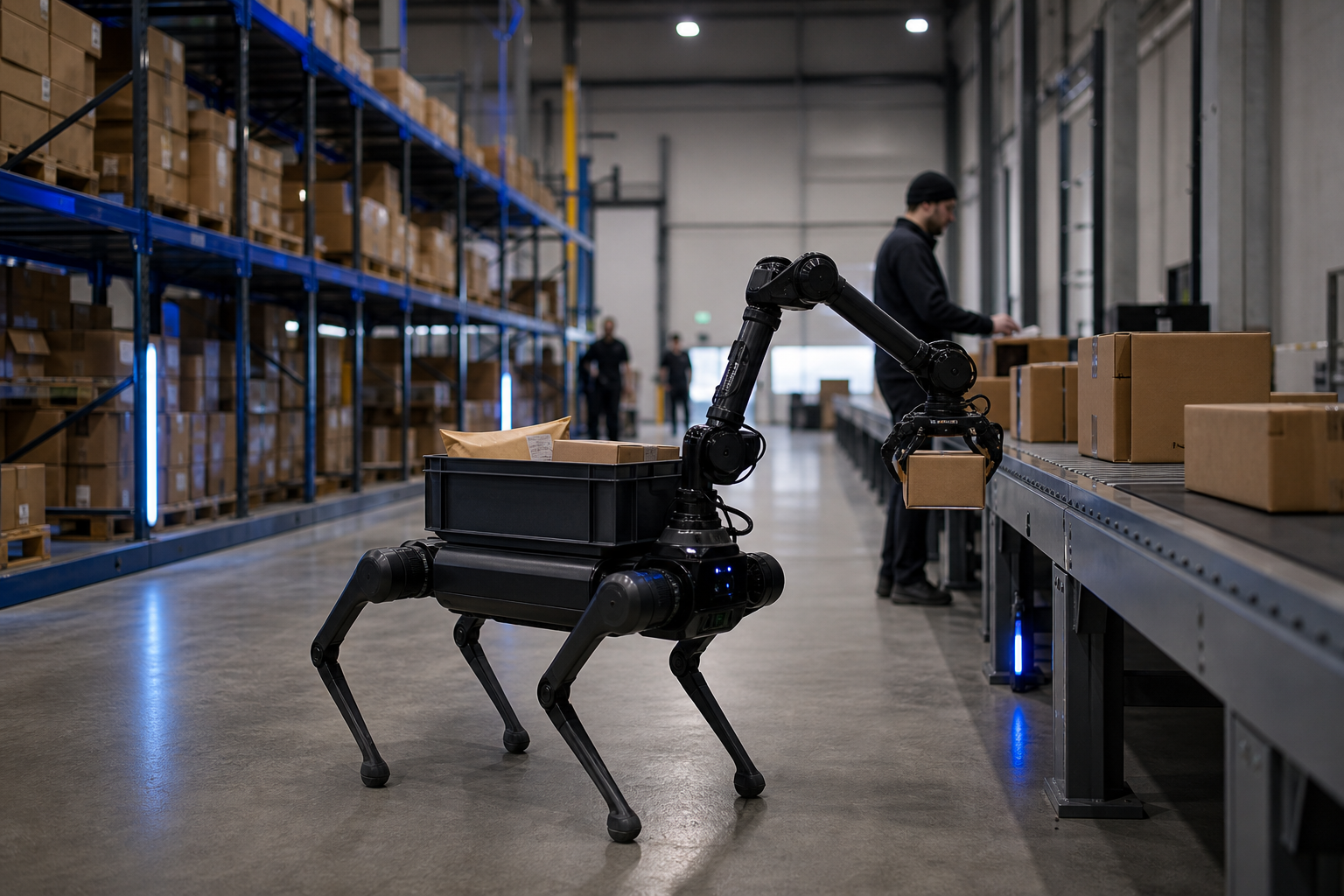

Now the failures. Companion robots break on edge cases and unstructured environments, and brittle hand-coded behavior does not generalize past the conditions it was scripted for. Acceptance is also context-dependent in ways that contradict the marketing. An experimental study published in the International Journal of Contemporary Hospitality Management found consumers can prefer robot service when a health risk is salient — during the COVID-19 pandemic, for example — but favor it less under normal conditions. The assumption that companion robots are universally welcomed does not hold up to the data.
The mitigation is structural to the modern pipeline. Pretrained policies plus simulation retraining let teams patch behavior in an afternoon rather than redesigning a product line over a quarter. When a robot fails an edge case in the field, you capture the condition, retrain against it in the sim twin, and redeploy — without a full ML rebuild.
There is also an ethics dimension you cannot skip. Kate Darling, a research specialist at MIT, has warned that people form attachments to responsive robots even when they know the robots are machines, and that design must set clear boundaries on data use, consent, and emotional manipulation. For companion robots operating around children or elderly users, that warning carries regulatory weight.
Build to the relevant standards from the start. ISO 13482 sets speed, force, and power limits for personal care robots operating near humans. ISO/TS 15066 provides numerical limits for human-robot contact force and pressure, directly applicable to collaborative manipulators and mobile bases. ISO 10218-1/2 governs industrial robots sharing space with workers. For functional safety, IEC 61508 and IEC 62061 frame the safety integrity levels used in robotic control where a fault could cause harm. These are not paperwork you add at the end — they constrain your design from the first sensor choice.
The robots that survive contact with the real world are the ones that can be retrained in an afternoon, not redesigned in a quarter.
Your Companion Robot Build Briefing
Take this checklist directly to your team. Each item synthesizes a decision from the sections above.
- Define the skill and body type. Decide humanoid, quadruped, or manipulator based on the task, not the demo you liked. Remember "companion" is the behavior layer, not the chassis — the same pipeline dresses any of the three.
- Inventory your environment for LiDAR capture. Identify the exact physical space the robot will operate in. That capture becomes your simulation twin, and a sloppy scan produces a sloppy training environment.
- Decide build versus platform. If your differentiation is the ML and you can amortize an 18-month bench, build. If you are a startup, integrator, or fleet operator racing to deployment, take the platform path. Be honest about which one you are.
- Select your edge tier. The entry tier — Orin Nano class, up to 67 TOPS, from the $1,499 Kinematics Mini — covers dev work and lightweight mobile robots. The industrial Kinematics Max enclosure handles continuous-duty humanoids, heavy manipulators, and fleets.
- Confirm hardware compatibility. Verify support for your platform — Unitree, Franka, Universal Robots, or general ROS2 — and confirm your edge box exposes the I/O you need: Gigabit Ethernet, USB 3.2, and MIPI CSI camera interfaces.
- Set your time-to-deployment target. Be realistic. Under-60-minute first skills apply to constrained tasks like single-route delivery. Complex multi-skill behavior takes iteration cycles, and budgeting for that honesty saves you from a blown timeline.
- Plan validation and retraining cadence. Budget for simulation retraining loops up front. This is your insurance against real-world edge-case failure, and it is what lets you patch behavior in an afternoon. Build to ISO 13482 and ISO/TS 15066 from the design stage, not as a retrofit.
The fastest route from environment capture to a deployed skill is the one that hands you a working pipeline instead of an empty research bench. A starter box and a trial run on the cap-x framework with the MIT-licensed OpenBrain edge stack let you scan, train, and deploy a first constrained skill before an in-house team would have finished hiring.
FAQ
Do I need machine learning expertise to build an AI companion robot in 2026?
Not for the platform path. Pretrained reinforcement learning policies combined with real-to-sim training remove the need for an in-house PhD bench for most constrained tasks — you adapt a working policy rather than build one from scratch. In-house ML expertise still matters if your competitive differentiation is the model itself, in which case you should own every layer. For everyone racing to a first deployment, the platform approach removes the single most expensive prerequisite.
Can one platform support different robot bodies — humanoids, quadrupeds, and manipulators?
Yes. Hardware-agnostic platforms support Unitree quadrupeds and humanoids, Franka and Universal Robots manipulators, and the broader ROS2 ecosystem. This works because "companion" is a behavior layer applied across body types, not a fixed chassis. The same intelligence pipeline can run navigation on a quadruped one day and grasp-assist on a manipulator the next, which matters for teams that run mixed fleets rather than standardizing on a single vendor.
How long does it really take to go from environment scan to a deployed skill?
Vendors advertise under-60-minute flows for constrained tasks like single-route delivery or simple pick-assist, drawn from vendor case studies. Treat that as a realistic target for a narrow first skill. Complex, multi-skill behavior still takes iteration cycles, and independent verification of the fastest claims is limited. The honest framing: hours for a first constrained skill, longer for a full product — both far below the legacy 12–18 month bespoke cycle.
Is the edge software locked to proprietary hardware, or can I run it on my own?
It depends on the stack. OpenBrain is MIT-licensed and runs on Jetson Orin Nano-class hardware, which is the deciding factor for academic and maker teams that refuse proprietary lock-in they can neither inspect nor modify. Before committing, verify the licensing terms and confirm the I/O compatibility your sensors and controllers require — Gigabit Ethernet, USB 3.2, and MIPI CSI camera interfaces form the practical minimum.